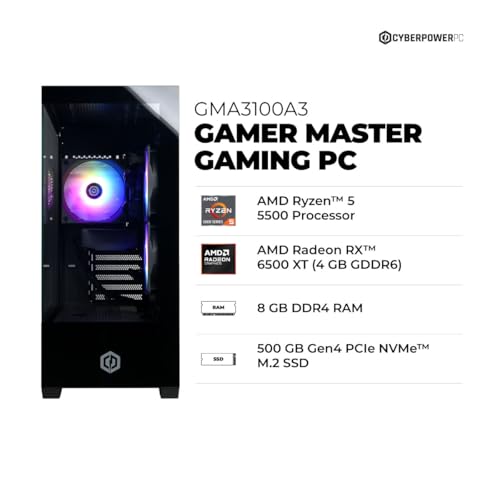


This Gamer Master suits someone getting started with PC games who mainly plays competitive titles, older releases or games with modest graphics requirements. Start with 1080p if your monitor supports it, and make room to adjust settings game by game. The RX 6500 XT has 4GB of video memory, so high-resolution textures are an early setting to turn down if a game stutters. Check the requirements of the specific titles you want to play before buying.
Two capacities to check
- Memory. The 8GB of system RAM has to cover Windows, the game and whatever runs in the background. Voice chat and a browser can add to that load. Compare the games’ recommended memory and ask how the installed RAM is arranged if an upgrade is part of your plan.
- Storage. The 500GB drive has to hold Windows and updates as well as games. Add up the install sizes of the titles you play regularly and leave room for patches. Check what expansion is available if you want to keep a larger library installed.
Choose a stronger configuration if your goal is to play recent, demanding releases at high settings or record gameplay while keeping several apps running. The first prebuilt gaming PC guide explains how to balance those needs.
Confirm the GMA3100A3 model number on the store page. Ask what the Wi-Fi ready wording includes, and check which monitor connection and peripherals you will need.
Choose how you will handle upkeep
Think about where the tower will sit between sessions. If the only space is on carpet or in a cupboard, check where the case draws in air and whether you can reach the intake to clean it. In a room with pets, put the tower where you can see when dust starts collecting. Check the case photos for the access you would have in that position.
If this is the first PC you will maintain yourself, ask which changes you can make without affecting warranty service. Find out who you contact if a part fails and whether the seller expects you to keep the shipping inserts. Store them where you can get them back out if needed.
The guide to owning a gaming PC helps put upkeep in context. For a setup a child will use, decide who will install updates and where you will keep account recovery information. Set up separate accounts if more than one person will play on it.