


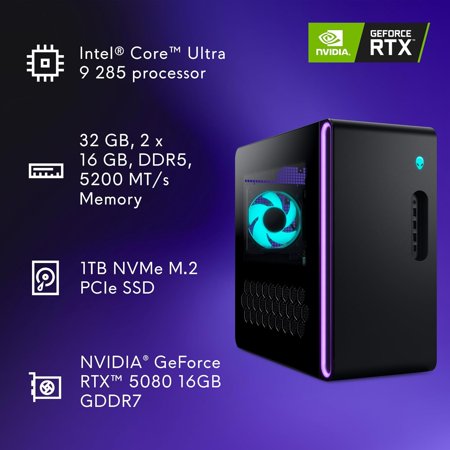

Start with the display you plan to use. The RTX 5080 is the part of this Aurora that makes the most sense for a high-resolution monitor, where games have more pixels to render for every frame. It is also relevant if your creative apps accelerate previews or effects on the graphics card. Look at benchmarks for the games and applications you use, since the return from a faster GPU depends heavily on the workload.
The Core Ultra 9 285 and 32GB of DDR5 fit a setup where games, voice chat and other applications may be open together. A 1TB SSD gives active projects and games a shared place to live. Add up the space your largest installs and local files will need before buying. Leave some headroom for updates, exports and temporary files.
Plan around the tower
The listing identifies liquid cooling and a 1000W power supply. If you expect to change parts over time, check supported drive slots, graphics card clearance and power connectors for the exact chassis. Also measure where the tower will sit and leave space for airflow. The guide to gaming desktops can help frame these questions.
If you mostly play lighter games on a standard Full HD screen, this configuration may offer more hardware than your routine calls for. Check the ACT1250 model and full processor designation before ordering because other Aurora configurations use similarly named chips.
What reviewers say
TechRadar reviewed a different Aurora ACT1250 configuration with a Core Ultra 7 and RTX 5070. The site liked the compact case, ventilation and access to the interior, but highlighted the proprietary motherboard as a limitation for future upgrades. In its gaming tests, performance depended on the title and settings, and gains over the previous Aurora were modest in several games. Those results help explain the chassis trade-offs. The tested build’s frame rates do not describe the RTX 5080 configuration listed here.
Sources: TechRadar


